Why you got less crypto than you paid for: reading a filled order line by line
A market buy never lands exactly amount divided by price. One 1,000 USDT order rebuilt from Binance's public LINK/USDT book on 2026-11-09, traced through the order line and the trade line to the coins that reached the wallet.
1,000 USDT into LINK, Binance spot book, 2026-11-09 08:17 UTC
- What the price on screen promised
- 96.88 LINK · 1,000 ÷ 10.322, the last trade
- What reached the Spot wallet
- 96.77 LINK · 0.107 LINK short
- Where the 0.107 LINK went
- 0.097 fee · 0.005 step size · 0.005 fill price
Nine tenths of the gap was the trading fee, taken out of the coins rather than out of the USDT. The rest came from the order filling a fraction above the price on screen, and from the quantity being cut to the pair’s step size, which left five cents of USDT unspent. Nothing went wrong, and every one of those numbers can be read off the order record once you know which line holds which.
The order above is a reconstruction, not a real trade: Binance’s public order book for LINK/USDT, downloaded at 08:17 UTC on 2026-11-09, walked by hand the way a 1,000 USDT market buy would walk it. Your own order will have other prices. Reading it works the same way.
Where the missing coins went
Coins you expected = amount spent ÷ the price you saw. Coins you got = executed amount − fee. On a deep pair the fee accounts for almost all of the difference; on a small order or a cheap coin, rounding to the step size can take a bigger share than the fee.
- The fee. 0.100% at the Regular User level, on Binance’s spot fee schedule as read on 2026-11-09, charged in the coin you bought. On 96.87 LINK that is 0.09687 LINK, about 1.00 USDT.
- The fill price. The large number on the trading page is the last trade. A market buy pays the ask, and once it has used up what sits at the best ask it carries on to the next prices up. Here the average came to 10.3225 against a last trade of 10.322.
- The step size. Each pair trades in a smallest unit. For LINK/USDT it is 0.01 LINK, so the order bought 96.87 LINK rather than 96.875…, and the 0.05 USDT that would have paid for the fraction stayed where it was.
Ranked by size, the fee nearly always comes first. The other two catch up only when the order is large for the book, or when the coin is cheap enough for one step to be worth something. A 50 USDT order for DOGE that same morning, priced at 0.0686 with a step of one whole coin, left 0.06 USDT unspent and paid 0.05 USDT in fee.
The order line: four numbers that have to agree
Under the chart on the trading page sits the Orders panel, and its Order History tab gives each order one line. Binance’s help page on viewing spot trading activity lists what that line carries. Three of those fields do the work here: the average executed price, the executed amount and the total. The fourth number, the fee, is not on that line at all.
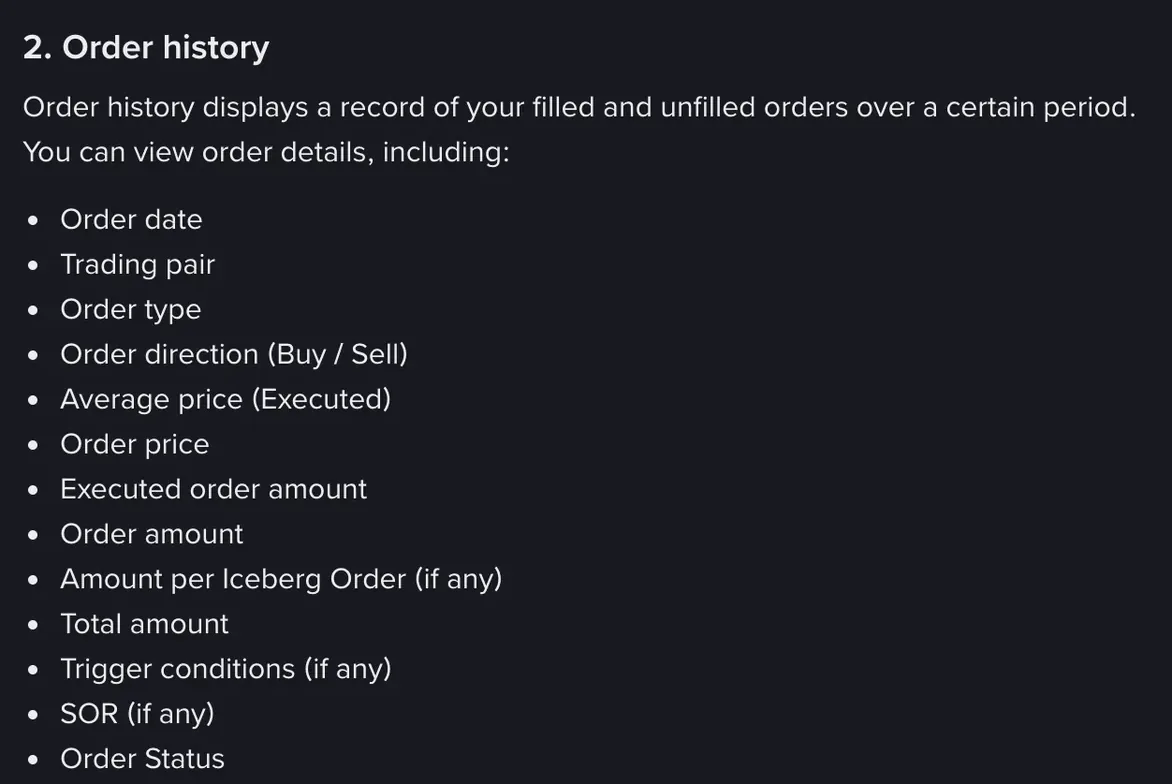
With the LINK order’s figures, the four checks run like this:
- Executed × average price = total. 96.87 × 10.322546 = 999.945 USDT. If that fails by more than a rounding hair, two orders are being mixed up.
- Amount entered − total = what stayed in USDT. 1,000 − 999.945 = 0.055 USDT. On a market buy entered as an amount, a few cents at most.
- Executed − fee = what reached the wallet. 96.87 − 0.09687 = 96.77313 LINK. Hold this figure against your balance.
- Total ÷ what reached the wallet = your real price. 999.945 ÷ 96.77313 = 10.3329 USDT per LINK, fee included. Use this one later for a break-even or an average cost, not the average price on the order line.
The field that trips people is the executed amount. It counts the gross quantity, before the fee comes off. It never matches the change in your balance, and the gap between the two is what this page is about.
Why the fee comes out of the coins and not the USDT
Binance charges spot fees in the asset you receive. Buy LINK with USDT and the fee is paid in LINK; sell LINK for USDT and it is paid in USDT.
That is Binance’s own rule, set out in its FAQ on calculating spot fees with an ETH example: buy 10 ETH at the regular 0.1% and the fee is 0.01 ETH; sell the same 10 ETH at 3,452.55 USDC and the fee is 34.5255 USDC.
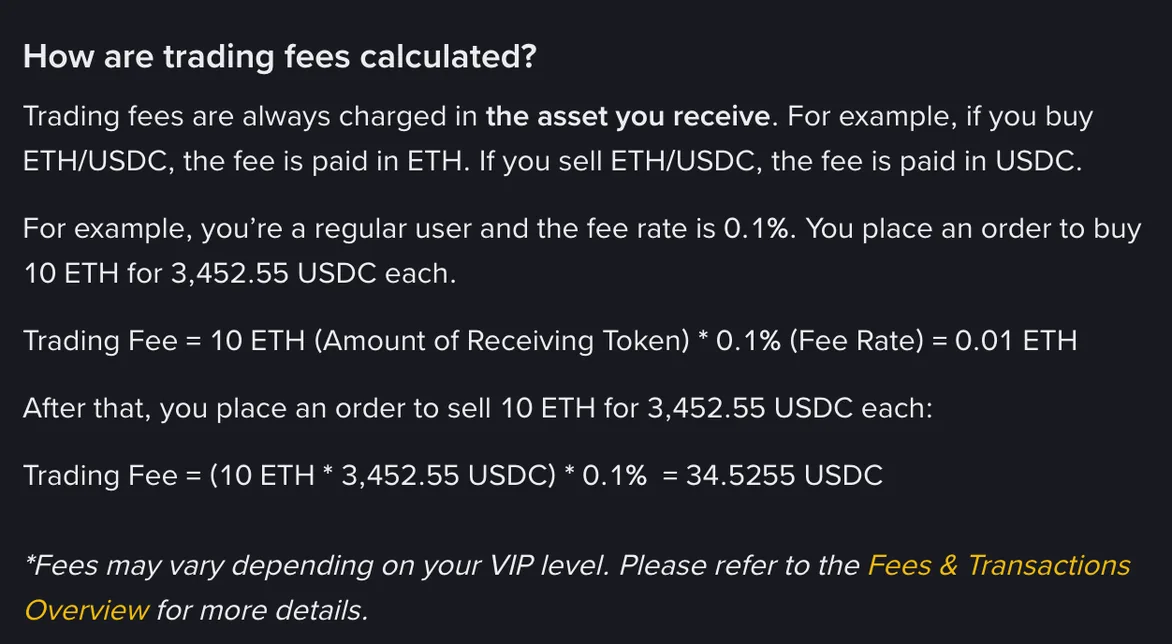
The same page says the Est. Fee figure on the order form is for reference only, and that the actual fee depends on what the trade finally delivers. On a market order the estimate is made before anyone knows where the order will fill, so the two rarely match to the last decimal.
Paying fees in BNB moves the cost rather than removing it. With the setting switched on and BNB in the Spot wallet, the schedule read on 2026-11-09 charges 0.075% instead of 0.100%, collected in BNB. The LINK line then shows no deduction at all: 96.87 bought, 96.87 in the wallet. The cost sits in a slightly smaller BNB balance, about 0.75 USDT of it on this order. If a balance reconciles perfectly in the coin you bought, look at BNB.
The 1,000 USDT order, fill by fill
The book was downloaded from Binance’s public market-data service between 08:17:32 and 08:17:52 UTC on 2026-11-09, using the depth endpoint described in Binance’s spot API reference. Anyone can request the same data without an account. The ask side, cheapest first, took the order like this:
| Fill | LINK | Price (USDT) | USDT spent | Fee (LINK) |
|---|---|---|---|---|
| 1 | 4.17 | 10.321 | 43.04 | 0.00417 |
| 2 | 35.65 | 10.322 | 367.98 | 0.03565 |
| 3 | 57.05 | 10.323 | 588.93 | 0.05705 |
| Order | 96.87 | 10.3225 avg | 999.95 | 0.09687 |
The two cheapest prices held only 39.82 LINK between them, so most of the order filled at the third, 10.323. That is why the average sits a fraction of a cent above the last trade. On 1,000 USDT the difference is worth about five cents, and the “fill price” line in the box at the top amounts to no more than that.
Trade History is where an order like this gets the most confusing. An order that crossed several prices can appear there as several rows, each with its own price, quantity and fee. Those rows are pieces of one order, not three orders. Add the fee column across them and you arrive at the single fee figure in the last row of the table.
Why the order stops a few cents short
A market buy entered as an amount of USDT tells the exchange how much to spend, not how many coins to get. Binance’s trading reference states the rule for orders placed that way: they will not break the pair’s LOT_SIZE rule, and the quantity chosen has the value closest to the amount. LOT_SIZE is the step. In Binance’s public pair rules that morning it was 0.01 for LINK, 0.001 for SOL, 0.00001 for BTC and one whole coin for DOGE.
On LINK one step is worth about ten cents, so the change left behind can only be a few cents. It is still in the Spot wallet as USDT. The only reason to know about it is that people go looking for a hidden charge when the total reads 999.95 instead of 1,000, and nothing was charged.
Selling: the same lines, with the fee in USDT
Turn the order round and sell the 96.77 LINK straight back. The step size trims it to 96.77, leaving 0.00313 LINK behind. The best bid that morning was 10.320 with 933 LINK waiting, so the whole sale fills at one price: total 998.67 USDT. The fee now comes out of what you receive, 0.9987 USDT, and 997.67 USDT lands in the wallet.
So a buy and an immediate sale of the same coin, at the same moment, turned 1,000 USDT into 997.67 USDT and a crumb of LINK. Two fees make up about 2.00 of the 2.33 USDT. The rest is the gap between buying at the ask and selling at the bid, the slightly higher fills on the way in, and the dust. On a sell, the order line’s total is the gross amount; the USDT you can spend is the total minus the fee, and the fee is again on the Trade History tab.
Checking your own order
- Order History: find the order and write down the average price, the executed amount and the total.
- Trade History: filter to the same pair and time, add up the fee column for that order, and note which coin the fee is in.
- Do the subtraction: executed minus fee, in the coin you bought. That should equal the change in that coin’s Spot balance.
- If it still does not match: check whether the fee went in BNB, whether the order filled only partly, and whether another order on the same pair filled around the same time. A purchase made through Convert has no order line at all; its cost sits inside the quote, as the Convert guide works through.
To see the fee line before you place an order, the trading fee calculator does that first subtraction for any amount. The spread and the fill price, the other two lines, are priced pair by pair in the real cost of a crypto buy.