Opening a Binance account, and where people get stuck
The sign-up itself takes a couple of minutes. Everything that goes wrong goes wrong afterwards — in verification, in the security settings nobody reads, and in the one field that only stays open for a short while.
- Get the document ready Unexpired photo ID, an email you will still control in five years, somewhere to write recovery codes.
- Check which entity serves you It decides which products you can even see.
- Register Four fields and a code out of your inbox. Two minutes.
- Fill the referral field before you submit Collapsed, easy to miss, and the one thing here with a deadline: afterwards it can only be added within 30 days and before any deposit or trade.
- Turn on two-factor Before verification, before the deposit, and on the email account too.
- Get through verification Where the trouble actually is.
- Deposit small, then go looking for it It lands in one of several wallets, not necessarily the one on screen.
Registering looks trivial until it isn't. Verification rejects your passport photo three times without explaining why, the referral field you skipped past can only be filled in later under conditions most people have already broken, and today's withdrawal is capped at a number you didn't expect.
What to have ready, and which Binance you get
A government photo ID that has not expired, a device you control, an email address you will still have in five years, and about twenty minutes.
The document matters more than anything else here. A passport is the smoothest option because machine-readable passports carry a standardised code strip at the bottom, and automated checks read that strip reliably regardless of what alphabet the rest of the page is in. National ID cards work, but the automated reader handles them less consistently across countries. Driving licences are accepted in some places and not others.
Check the expiry date before you photograph anything. An expired document is a frequent rejection cause and among the slowest to spot, because the check comes back as a generic failure rather than "this expired in March". No platform publishes rejection statistics, so treat that as an ordering worth working through rather than a measured ranking.
On the email address: use one you control directly and expect to keep. Not a work address, which stops being yours when the job does. Not an address on a domain you rent, unless you intend to keep renewing it. Exchange accounts are hard to recover and the email is the root of that recovery.
You will also want somewhere to store recovery codes that is not the phone you are about to install the authenticator on. Paper is fine. A password manager is better. The inside of your head is not, and neither is a screenshot in your camera roll.
Which Binance you are actually signing up to
Whichever regional entity serves your location, and the answer changes what products you can use and which rules apply to you.
The brand is one thing; the operating entity behind it is another. Depending on where you are, registration routes you to a different legal entity, sometimes on a different domain, with a different product list and a different regulator. Users in the United States are served by a separate company with a materially smaller product range. Several jurisdictions have local entities with their own registration and their own restrictions. Some countries are not served at all.
This is worth two minutes of your attention before you start, because it determines whether the futures product you read about is even available to you, and because signing up to the wrong entity for your residence is a problem that surfaces later, during verification, when it is more annoying to fix.
The practical check: read the terms the sign-up page presents, and read the country selection at verification carefully rather than clicking through it. If your residence and your document nationality differ, that is normal and fine, but declare them accurately — a mismatch you invented to get past a form is a much worse problem than a mismatch you declared honestly.
Availability and product access by country change with regulation and are not stable enough to write down here with any confidence. Binance's own terms of use and regional notices are the authority, and they are updated more often than any third-party summary.
Creating the account in about two minutes
Open the sign-up page, register with an email address, set a password, confirm the code they send you, and you have an account — the whole thing takes about two minutes.
Start here: open the Binance registration page with this site’s code, BN8692, already in the referral field. It opens in a new tab so this page stays where it is while you work through the form.
Disclosure: that is a referral link, and this site may earn a commission if you register through it. Binance describes referral commission as a share of the trading fees the referred account pays, so the code adds no charge of its own. Whether any of that commission comes back to you is decided by how the referrer set up the link: under Binance’s Referral Pro rules the referrer can pass part of it to the person they invite, as a rebate paid in USDC. This page does not promise a rebate of any particular size. Binance does not serve every country and restricts some products by region, so read the terms it shows for where you live. And trading crypto loses money for most retail participants; a referral code does nothing to change that. It is the only link of its kind in the English edition of this site; the Kiswahili and French editions each carry one equivalent link on their own version of this page, and nothing else on any of the three editions does. The disclosure page sets the arrangement out in full.The registration screen offers a few routes: email or phone, plus social sign-in options. Take email. Phone numbers get recycled by carriers, and a number that is no longer yours in the hands of someone else is a genuine account-takeover path. Social sign-in ties your exchange account's availability to a third-party account you don't control the policy of.
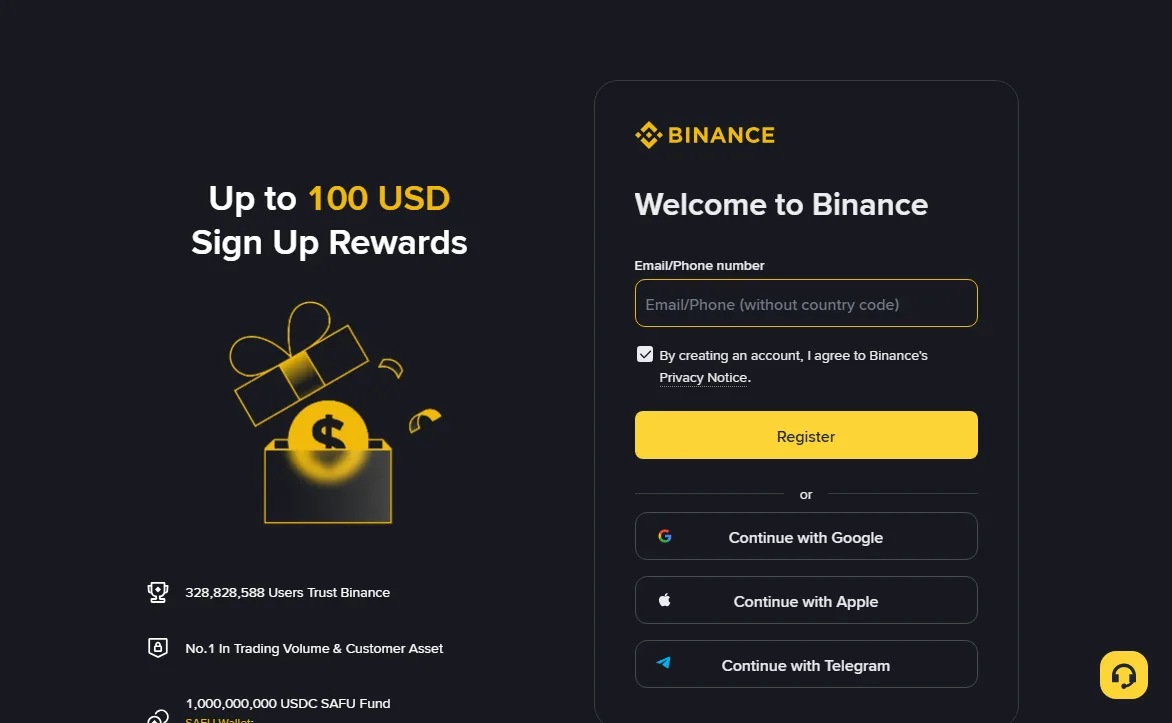
The password should be generated by a password manager and stored there. This is not general advice given out of habit — an exchange login is a bearer credential for money, and the most common way accounts are drained is credential reuse from an unrelated breach, not anything clever aimed at the exchange.
You will get a verification code by email. Enter it. At this point you have an account, and you have not proved who you are, and you should not send any money to it yet.
Where does the referral code go?
Into the referral or invite field on the registration form, which is usually collapsed behind a small link labelled something like "Referral ID (optional)" — you have to open it deliberately, and it is easy to miss entirely.
This is the step this article exists to flag, because it is the one thing on the sign-up path with a deadline. The field is small and visually de-emphasised, and if you complete registration without it, Binance only lets you attach a code afterwards inside a narrow window with strict conditions, set out in the next section.
This site's code is BN8692. If you opened the form through the link in the previous step, it is already in that field. If you are signing up in the Binance app instead, the same field appears on the sign-up screen: copy the code here and paste it in.
Either route ends in the same place: the field populated before you press register. Check it is actually filled in before you submit — on narrow screens the panel sometimes collapses again when the keyboard opens, and people submit with it empty without noticing.
Can I add a referral code after signing up?
Sometimes, but only inside a narrow window: Binance lets a new account bind a referral code after registration only within 30 days of signing up, and only if the account has had no deposit or trading activity yet.
Binance’s Referral Pro FAQ (updated 2026-08-05, read 2026-10-13) lists every condition, and all of them have to hold at once: the account is within 30 days of registration, it has no deposit or trading activity, it has no existing referral relationship, it is a main account rather than a sub-account, the identity documents behind it have not been used on another account in the past 180 days, and it is not flagged for wash trading. If all of that is true, the code can still be bound through the form Binance offers new accounts for this; enter this site’s code, BN8692, there. If any one of them fails, the answer is no, and once a referral relationship exists it cannot be changed or removed.
So the order of operations matters if you missed the field: bind the code before your first deposit, not after. If the window has closed, accept the standard fee schedule, which is what most people are on anyway. Do not close the account and register again to pick up a code: the same FAQ says that if Binance detects an account was closed to create a new one for referral benefits, it can terminate the referral commissions on the new account, and a re-registration with the same identity is flagged as a duplicate. The fee difference is not large enough to justify any of that — the arithmetic on what a fee reduction is actually worth makes that fairly clear.
What you should not do is open a second account alongside the first. Major exchanges treat multiple personal accounts as a terms violation, and the sanctions their terms reserve run as far as restricting or closing the accounts involved while it gets sorted out — a far worse outcome than paying full fees. What happens in any individual case is the platform’s call, and the binding text is its own terms of use, not this page.
Lock down access before you do anything else
Set up two-factor now, because the window between "account exists" and "account is protected" is the one an attacker with your reused password wants, and closing it takes ninety seconds.
Do this before verification, before deposits, before you look at a single chart. An authenticator app — the standard time-based one-time password kind — is the baseline. Any of the mainstream ones work; the protocol is the same.
SMS as a second factor is better than nothing and worse than an app. The attack against it is SIM swapping, where someone persuades a carrier to move your number to their device, and it is a routine technique rather than an exotic one. If SMS is the only option available to you in your region, use it, and treat it as a temporary state rather than a solution.
Passkeys and hardware security keys, where offered, are stronger than both. A hardware key cannot be phished, which is the single most useful property a second factor can have, because phishing is how most of these accounts are actually lost.
Write down the recovery codes. Put them somewhere physical. The number of people who lose an exchange account because they changed phones without migrating the authenticator is not small, and there is frequently nothing support can do that does not involve a multi-day identity process.
The email account underneath it
The email account matters at least as much as the exchange one, because it is the root of account recovery — whoever controls the inbox can eventually control the exchange account, regardless of how good the exchange password is.
This is the part that gets skipped, and it undoes everything else. You can pick a long random password, enable an authenticator app and whitelist your withdrawal addresses, and none of it survives an attacker who owns your email. Account recovery exists precisely so that a locked-out user can get back in, and they all route through the inbox.
So the email account needs at least the protection the exchange account has:
- Its own two-factor, on an app or a hardware key. An email account protected only by a password is the weakest link in the chain, and it is the one nobody thinks to check.
- A password that is not used anywhere else. Credential stuffing works because reuse is ubiquitous. The attacker does not need to break your email provider; they need one breach at any site where you used the same pair.
- No forwarding rules you did not create. A quiet forwarding rule is the classic persistence trick after an inbox compromise: the attacker keeps reading recovery codes long after you have changed the password. Open the filter settings once and look.
- A recovery phone number and address you still control. Stale recovery options are how people lose the account that guards every other account.
A related habit worth forming: use an address that is not obviously connected to your public identity, and do not post it anywhere alongside talk of crypto holdings. Targeted phishing against people known to hold crypto is an industry, and the first thing it needs is an address to aim at.
If you use a password manager, this is also the moment to check that its own vault is protected by something stronger than a memorable password. The vault holds the exchange credential, the email credential and possibly the authenticator seeds. Concentrating all of that behind one weak factor is a common and expensive mistake.
What does identity verification actually check?
That the document is genuine and unexpired, that the face in the selfie is the face on the document and is physically present, and that the name and date of birth you typed match what the document says.
Four things happen, usually in one sitting:
- Personal details. Legal name, date of birth, nationality, residential address. These are compared against the document, so type them exactly as the document has them, not as you normally write them.
- Document capture. Photographs of your ID. The automated reader is looking for the machine-readable zone, the security features, the expiry date, and evidence that it is a physical document rather than a photograph of a screen.
- Liveness check. A short selfie video or a sequence of prompts. This is checking that a live person is present, not that you are photogenic. It is defeating a printed photo held up to the camera, not judging you.
- Screening. Behind the scenes, your details are checked against sanctions and politically-exposed-person lists. This is a legal requirement, not a discretionary policy, and it is why the process cannot simply be skipped.
Higher tiers exist beyond the basic one and generally require proof of address — a utility bill or bank statement, recent, showing the same address you declared. These raise your limits. Whether you need them depends on how much you intend to move; the limits by tier are worth checking before you assume you need the higher one.
Binance’s identity verification FAQ says submitted documents are usually reviewed within 48 hours and that some cases take longer. There is no way to hurry this from your side, which is why getting it right the first time is worth the extra two minutes. The same page warns that the personal details you confirm at the end cannot be changed once confirmed, so read them against the document before you press continue.
Why it keeps failing
Six things account for nearly all of it, and five of them are photography problems rather than identity problems.
The failure message is usually generic, which is the frustrating part — it tells you it failed, not what failed. Working through the list in order will resolve most cases:
| What went wrong | What it looks like | Fix |
|---|---|---|
| Glare on the laminate | Rejected immediately, no detail given | Diffuse daylight, no flash, tilt the document rather than the camera |
| Edges cropped | "Document not fully visible" | All four corners inside the frame with margin around them |
| Photo of a screen or a photocopy | Rejected as not genuine | The physical document, in your hand |
| Expired document | Generic failure | Check the date; renew or use another document |
| Name order mismatch | Passes the document check, fails the details check | Type it exactly as printed, including the order and any middle names |
| Address proof too old or the wrong name | Fails only at the higher tier | A recent statement in your own name at the declared address |
The name-order one deserves a note because it catches people out repeatedly and does not feel like an error. In many countries the family name is written first, and passports print it in a specific field order that may not match how you introduce yourself. The check is a string comparison against the document. Match the document.
There is also a limit on attempts. Binance’s current verification FAQ does not publish the number, so assume it is small and that reaching it means waiting before you can retry, which turns a ten-minute problem into a next-day problem. Change something real between attempts rather than resubmitting the same photograph.
The longer guide on verification failures goes through the awkward cases — mismatched alphabets, recently changed names, documents from countries with unusual formats.
How should I make the first deposit?
Small, and on a network you have confirmed the exchange credits, before you send the amount you actually care about.
A test transfer is not paranoia, it is cheap insurance. Send a small amount first. Confirm it arrives and is credited. Then send the rest. The cost of the extra transfer fee is trivial against the cost of discovering a problem with the full amount in flight.
Two things to get right, and they are the two things behind most "my deposit is missing" questions:
- The network. The same ticker exists on several chains and they are not interchangeable. Copy the deposit address from the exchange after selecting the network, and select the same network on the sending side. This is covered properly in the piece on choosing a transfer network.
- The memo or tag. Some assets require a destination tag alongside the address. If the deposit screen shows one, it is not optional — the address alone identifies the exchange, and the tag identifies you within it. Omitting it means the funds arrive at the exchange and are not attributed to your account.
Both of those mistakes are usually recoverable and neither is quick. The guide to a deposit that hasn’t arrived covers what to do and what information a recovery request needs.
If you are buying with a card or a bank transfer rather than depositing crypto, be aware that the on-ramp is by a wide margin the most expensive step in the whole chain — the cost sits in the quoted rate rather than in a fee line, which is exactly why it doesn't feel expensive.
Why you can’t see the money you just deposited
Because an exchange account is several separate wallets rather than one balance, and a deposit lands in a specific one — usually not the one you are looking at.
This produces more genuine alarm than almost anything else in the first week. The transaction confirmed, the explorer shows it arrived, and the trading screen says zero. Nothing has gone wrong; you are looking at the wrong compartment.
The compartments, and what each is for:
| Wallet | What it is for | What confuses people |
|---|---|---|
| Spot | Ordinary buying and selling on the order book | This is the default trading balance, and the one most guides silently assume you are in |
| Funding | Peer-to-peer trades and some payment features | P2P purchases land here, not in Spot, so a bought balance appears missing until you transfer it across |
| Futures | Margin backing derivatives positions | Money has to be deliberately moved in, and while it is there it is exposed to positions rather than sitting idle |
| Earn or savings products | Assets committed to a yield product | Balances here may be locked for a term, so “withdraw everything” will not catch them |
Moving between these is an internal transfer. It is instant and it does not cost anything, because nothing touches a blockchain — the exchange is updating its own ledger. That is worth knowing in its own right: shuffling funds between your own wallets on one exchange is free, while sending to another platform is not.
Two practical consequences. When a guide tells you to do something and the balance is not there, check the other wallets before assuming a problem. And when you are emptying the account, check every compartment rather than the one on screen — a forgotten Funding balance or a locked Earn position is the usual reason someone thinks they withdrew everything and then gets a statement showing otherwise.
Three settings to change, and the messages that follow
Withdrawal address whitelisting, the anti-phishing code, and turning off any notification channel you don't actually read.
Address whitelisting restricts withdrawals to addresses you have pre-approved. On Binance it lives under Settings → Withdrawal, and it comes with a separate switch worth turning on as well: the whitelist withdrawal limit, which blocks withdrawals to a newly added whitelist address for 24, 48 or 72 hours, whichever you choose. Binance’s withdrawal settings guide describes both, and notes that changing the whitelist itself can also pause withdrawals for the same kind of period. Together they are the most valuable settings on the account. They convert “attacker has your session” from a total loss into a delay during which you can react. The friction is real — you have to add addresses a day or more before you need them — and it is worth it.
The anti-phishing code is a short phrase you set, which then appears in every genuine email from the exchange. Emails without it are fake. This defends against the most common attack by volume, which is a well-designed email telling you to log in and confirm something urgent.
Device and session management is worth opening once so you know where it is. Review the active sessions, and remove anything you don't recognise or no longer use.
One thing not to do: do not enable API keys unless you have a specific reason, and if you do, never grant withdrawal permission to a key. An API key with withdrawal rights that leaks is functionally the same as handing over the account.
Who is going to contact you, and why you should ignore them
Nobody from an exchange will ever call, message or email you asking for a code, a password or a transfer — every message that does is a scam, without exceptions worth entertaining.
New accounts attract attention. Some of that is because leaked or scraped contact lists circulate; some of it is because people announce their new interest in crypto publicly. Either way, the patterns below are worth recognising before you meet them, because they are designed to work on someone who is new enough not to know what is normal.
- The urgent security call. Someone claiming to be from the exchange says your account is compromised and they will help you secure it. They ask you to read out a code, install a remote-access tool, or move funds to a “safe wallet”. All three are the attack. No exchange operates this way, and the safe wallet is theirs.
- The support account in your replies. Post publicly about a stuck withdrawal and several accounts with official-looking names will appear within minutes offering to help. Support does not work by direct message and does not find you first.
- The recovery service. Aimed at people who have already lost money, and often the second hit on the same victim. Nobody can reverse a confirmed on-chain transaction. An upfront fee to recover lost funds is a fee to lose more.
- The task or reward job. Small payouts for simple tasks, escalating deposits, and then the withdrawal requires a further payment. The early payouts are real, which is what makes it work.
- The patient introduction. A conversation over weeks that gradually turns to a trading platform the other person is doing well on. The platform is fabricated, the balance shown is a number in a database, and it is the largest category of loss by value.
Two rules cover almost all of it. First: verification codes are for you and nobody else, ever, including someone who has correctly told you your own name and the last four digits of something. Second: the direction of contact matters. If they reached you, assume it is hostile; if you initiated the contact through the app or the official site, you are on firmer ground.
The anti-phishing code mentioned above is genuinely useful here, because it turns “is this email real?” from a judgement call into a check.
What should I be recording from day one?
Every deposit, trade and withdrawal, with dates and amounts, in a file you control — because exchange export tools are limited and account access is not guaranteed forever.
This is dull and it is the advice people most often wish they had taken. Two reasons it matters:
Tax. Most jurisdictions treat disposals of crypto as taxable events, and the reporting burden sits on you rather than on the exchange. Reconstructing a year of activity after the fact is painful, and it is much worse if you used more than one platform. Exchange export tools typically cover a limited window and do not always survive account or product changes. What the rules are where you live is a question for someone qualified in your jurisdiction — this is a note about keeping records, not about how to treat them.
Access. Accounts get restricted, products get withdrawn from regions, and companies change what they offer. An account you cannot log into is also an account whose history you cannot download. A local copy costs nothing and removes that dependency.
A spreadsheet with date, asset, amount, counter-asset, fee and a transaction reference is sufficient. Export the exchange’s own history periodically as well — quarterly is plenty — and keep the files somewhere that is backed up.
The same file makes the cost arithmetic on this site actually usable. Working out what a year of trading cost you in fees and spreads requires knowing what you did, and almost nobody remembers.
What should the first week look like?
Small, slow and boring — a test deposit, a small trade to see how the interface behaves, and nothing leveraged.
The interface will push in the other direction. Futures, margin, and various yield products are prominently placed, and the first-time screens are designed to get you to a trade quickly. There is no hurry.
A reasonable sequence:
- Test deposit. Confirm it credits. This validates that you have the network and the memo right before it matters.
- A small spot trade, and then look at what it actually cost. The fee calculator gives you the expected number to compare against.
- A test withdrawal back out, of a small amount, to an address you control. Knowing that money can leave is worth more than knowing it can arrive, and if you switched on the whitelist withdrawal limit, a newly added address cannot receive anything until the period you chose has passed.
- Only then, if at all, anything more complicated.
Leave the leveraged products alone for now. The liquidation math is worth reading before opening anything on margin, and the honest summary is that at the leverage levels the interface offers by default, an ordinary day’s movement is enough to close the position out.
The thing to resist is treating the account balance as a score. It goes up during the first week for a lot of people, because most weeks are up weeks in something, and that is not evidence of anything.
What a referral rebate is actually worth
On a small account, less than people expect — it is a percentage off a fee that is already a fraction of a percent, so the absolute saving only becomes meaningful at volume.
Being straight about this matters more than talking it up. On Binance’s published spot schedule, read again on 2026-10-13, a regular user pays 0.100% maker and 0.100% taker. Any referral rebate is a share of the commission generated by that fee, not a cut in the rate itself, so on a round trip of a few thousand dollars it is measured in cents to low single-digit dollars.
That is not nothing, and it compounds if you trade often. But it is dwarfed by three other costs on the same account: the spread you pay on an on-ramp purchase, the slippage on a market order into a thin book, and the flat fee on a small withdrawal. If you are optimising, optimise those first. The guides on what a transfer really costs and why market orders fill badly are where the money actually is.
How much comes back, if anything, is fixed on the referral link by the person who created it, and Binance’s FAQ says a link’s settings cannot be edited once it exists. Its own rules also stop paying referral commission — and so any rebate shared from it — once the referred account reaches spot VIP 3. Anyone quoting you a fixed, permanent percentage for every code is guessing; the rebate records in your own account are where the real figure shows up.
None of this is advice about whether to trade. Crypto trading loses money for most retail participants, leverage accelerates that, and a fee discount does not change the arithmetic of a bad position. The risk disclaimer is not boilerplate on this site.
And if you want to close the account
Withdraw everything first and confirm it arrived, then delete the account from Account → Security → Account Management → Delete Account — and expect the identity records to be retained regardless.
The order matters more than it looks. Binance’s account deletion guide says deletion is irreversible, that assets still in the account when you confirm will be lost and cannot be recovered, and that you will no longer be able to view your transaction history. So move the funds out, confirm they arrived, and export your history before you start. Check for balances sitting outside the main wallet too — funding accounts, earn products and open orders all hold value that a quick glance at the spot balance will miss.
What deletion does not do is erase you from their records. Anti-money-laundering rules require identity documentation to be retained for a period set by regulation, typically years, and that obligation overrides a deletion request. This is not the exchange being obstructive; it is a legal requirement that applies to every regulated venue.
The referral relationship goes with the account. Closing it ends the arrangement described on the disclosure page, and Binance’s referral FAQ says an account closed in order to re-register for referral benefits can have the new account’s referral commissions terminated. This is worth knowing but it is not a reason to keep an account you do not want.
If you are closing because you have decided this is not for you, that is a perfectly sensible outcome and worth stating plainly on a page that is otherwise a walkthrough of how to sign up. Nothing on this site is an argument that you should have an account, and a guide to opening one is not the same thing as a suggestion that you do.
Common questions
The ones that come up most, answered without hedging where the answer is actually clear.
Can I add a referral code after I have already registered?
Sometimes. Binance lets you bind a referral code after registration only within 30 days of signing up and only if the account has had no deposit or trading activity, has no existing referral relationship, and meets the other conditions in its Referral Pro FAQ. Once a referral relationship exists it cannot be changed. If the window has passed, the standard fee schedule applies.
Does using a referral code make my fees higher?
No. Binance describes referral commission as a share of the trading fees the referred account pays, so the code adds nothing to what you pay. Whether part of that commission comes back to you as a rebate depends on how the referrer set up the link.
How long does identity verification take?
Binance says submitted documents are usually reviewed within 48 hours, and that some cases take longer. There is no way to speed it up from your side beyond submitting cleanly the first time.
Do I need to complete verification before I can deposit crypto?
On Binance, yes. Its identity verification FAQ says all new users must complete the Verified level to access its products, including crypto deposits and trading. Verify first and send funds afterwards.
Should I use my phone number or my email to register?
Email, in most cases. Email addresses are easier to keep control of long term than phone numbers, which get recycled by carriers and are exposed to SIM-swap attacks. You can add a phone number afterwards for notifications.
What happens if my documents are in a different language or alphabet?
Machine-readable passports are handled well because the code strip at the bottom is standardised. Non-Latin national ID cards are handled less consistently, and a passport is usually the smoother option if you have one.